HMC
Every part leaves the line with its own identity
Intelligent laser marking for medical device production
Version 1.1.2 — HMC Group
In brief
HMC connects the production order to the laser marker: the operator loads the order, checks the data and starts marking. Product code, lot, expiry date, serial number and QR reach the laser without being copied by hand. Every device leaves the line with its own identity — traceable and permanent.
One clear idea
In medical manufacturing, a good product is not enough. Every single piece must also prove who it is: product code, lot, expiry date, serial number. One mistyped digit on the laser, one wrong lot, one incomplete QR code — and the line stops, quality stops, shipping stops.
HMC is the bridge between the production order and the laser marker. Operators no longer copy data by hand. They do not guess the program. They do not hope the part is “the right one”. They open the order, check it, confirm, and start. The laser receives everything. The part leaves with its own identity, permanently marked.
The result. Every device leaves the line carrying its story: what it is, when it expires, which lot it belongs to, and which unique number sets it apart from every other piece.
Who it is for
HMC is built for people on the shop floor — not for people who live at a desk.
| For | What changes |
|---|---|
| Line operator | Fewer keystrokes, fewer doubts, more parts marked correctly. |
| Production manager | Faster cycles, fewer stops, data always aligned with the order. |
| Quality & regulatory | Real traceability: lot, expiry, serial and QR, ready for audit. |
| Line technician | Laser and production data are connected once, from a single clear screen. |
How it looks
Four screens. Nothing extra. Nothing to memorise.
- Sign in — the person on shift enters with their own credentials
- Production — load the order, check it, mark it
- Laser programs — each size has its own laser program
- Settings — connect the marker and the order archive
1. Sign in — only the right people get in
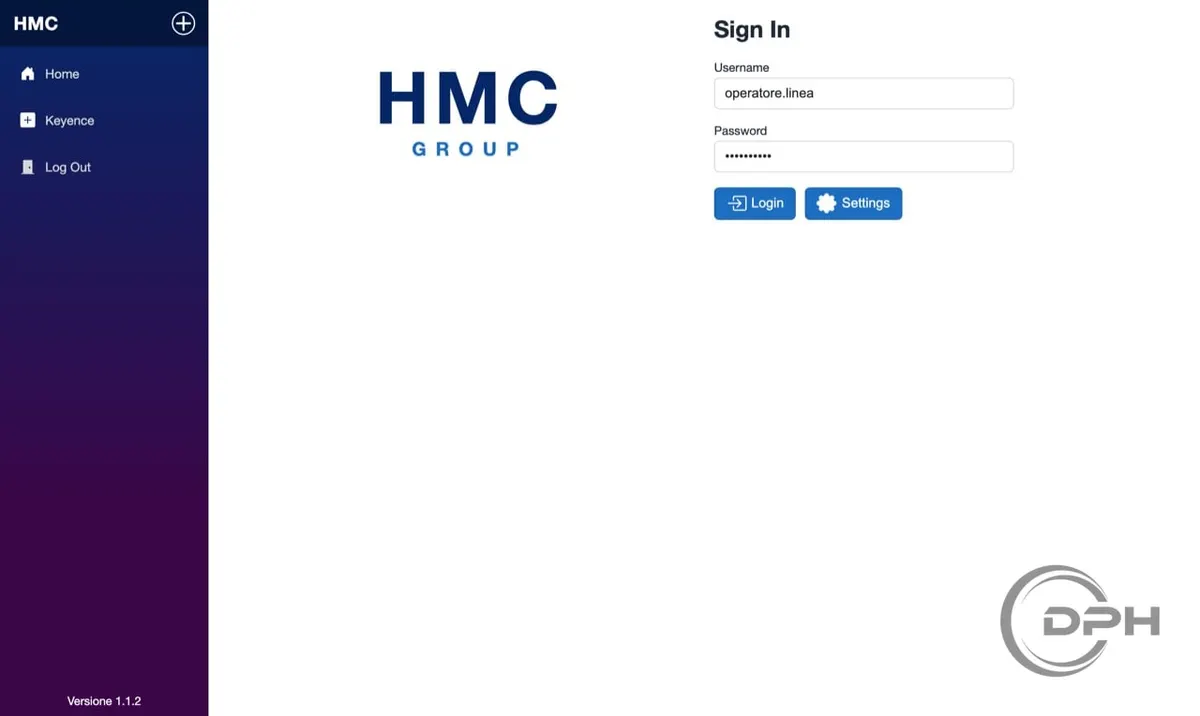
Secure access for line operators
The day starts with a simple doorway: username, password, one button. No clutter. No extra steps.
- Each operator signs in with their own profile: you know who worked, and when.
- A second button opens Settings, for the person who connects machines and data — not for the person who only needs to produce.
- The menu on the left stays in sight: Home, laser programs, log out. You know where you are in a second.
It is the first message HMC sends to the people who use it: work happens here with order.
2. Production — the heart of the line
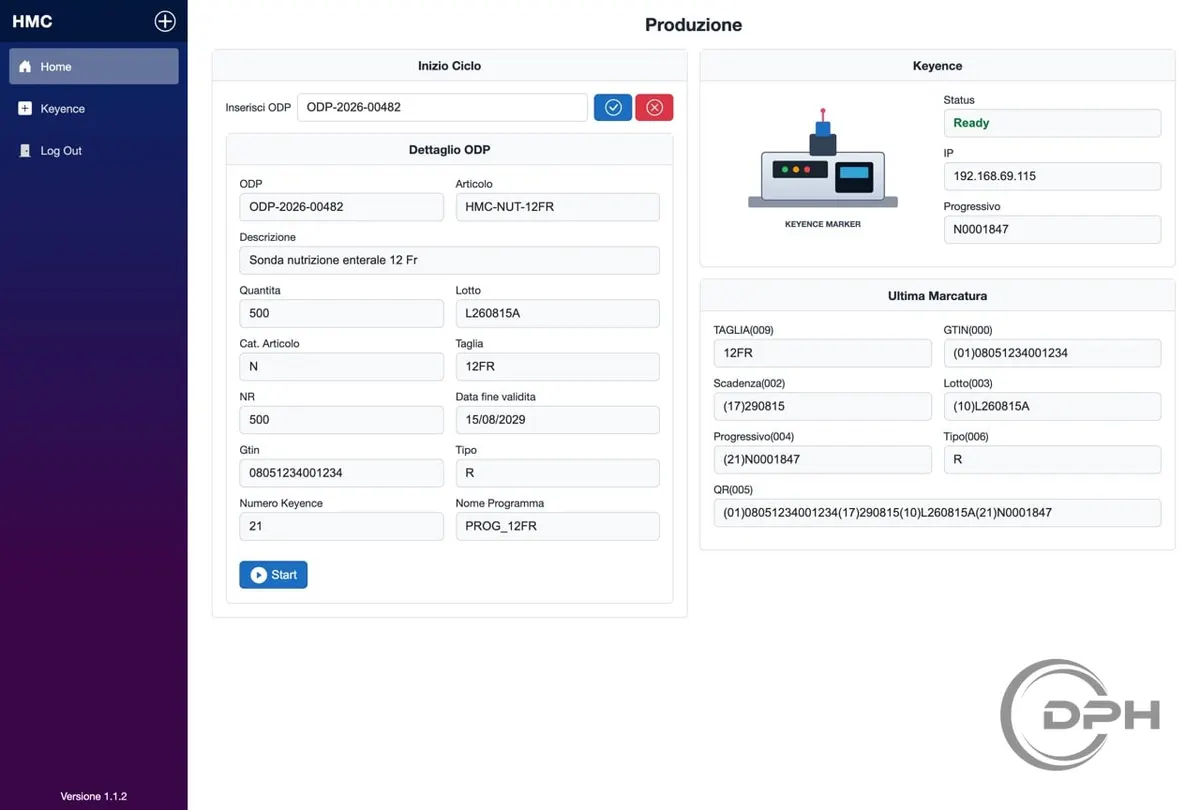
One glance: the order on the left, the laser and the last marking on the right
This is the screen the operator keeps in front of them for the whole shift. Everything they need is in a single view.
It starts with the order
The operator enters the production order code and confirms. HMC fetches the data and shows it, ready to use, in the Order detail panel:
- article and description
- quantity to produce
- lot
- size
- expiry date
- product code
- type
- laser program linked to that size
Nothing to invent. Nothing to copy from a sheet of paper. If something is missing, the system warns before sending data to the laser — not after, on the wrong part.
When the data is correct, the operator confirms and then presses Start. From that moment, the work belongs to the marker.
The laser, always in sight
On the right, the Keyence panel says at a glance whether the machine is ready, where it is connected, and which serial number is about to be marked. Nobody starts blindly. If the marker is not ready, you see it immediately.
The last marking, still visible
Below, the last data sent to the laser stays on screen:
- size
- product code
- expiry date
- lot
- serial number
- type
- the full QR, with every piece of information in a single code
It is visual proof of the part just made. Useful for a quick check. Useful when someone asks: what did we just mark?
No more “I think it was this lot”. The data comes from the order. The laser receives the same data. The last marking shows it again, in black and white.
3. Laser programs — the right size, the right mark
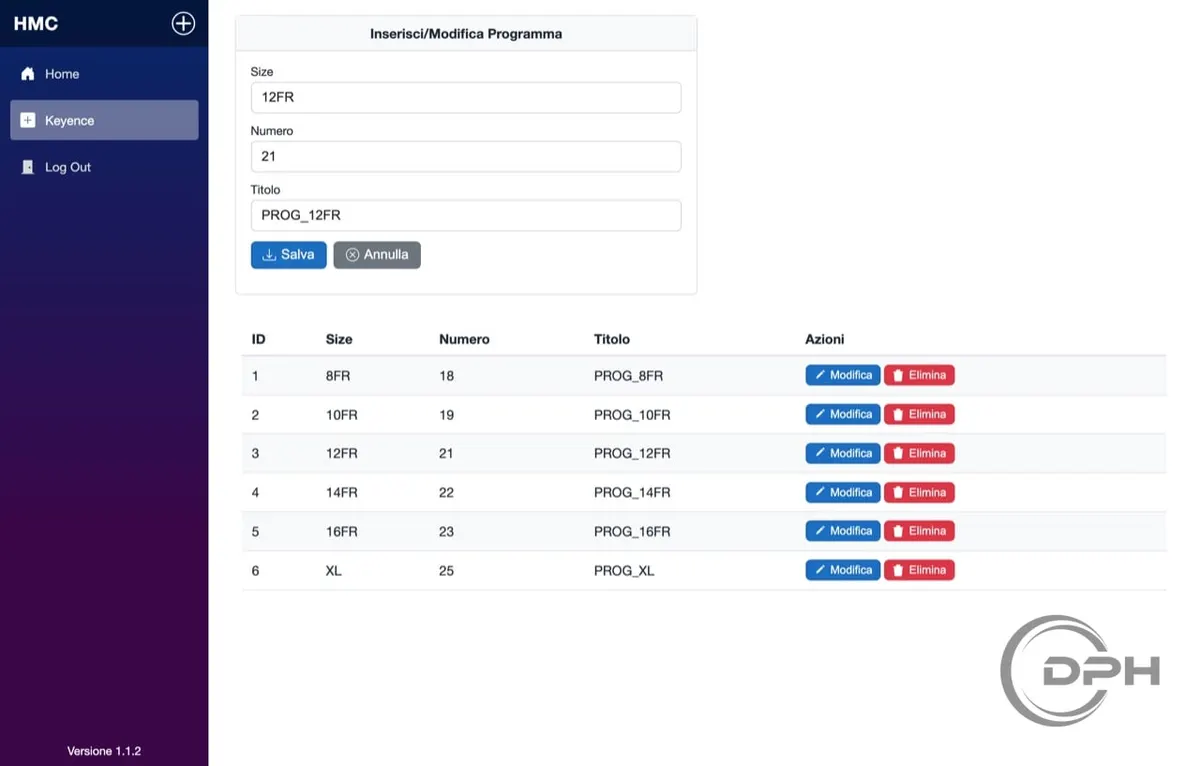
Each size has its own marking program
An 8 French tube and a 16 French tube are not marked the same way. HMC knows that, and makes it simple.
On the Keyence page you link size, program number and name. A table lists everything already set up. You add, edit or delete — with two buttons, no lab manual required.
When a production order arrives with a given size, HMC picks the right program on its own. The operator does not have to remember “12 Fr is program 21”. The system does.
That is how you avoid the most expensive mistake: marking the right data on the wrong layout.
4. Settings — set it once, then produce
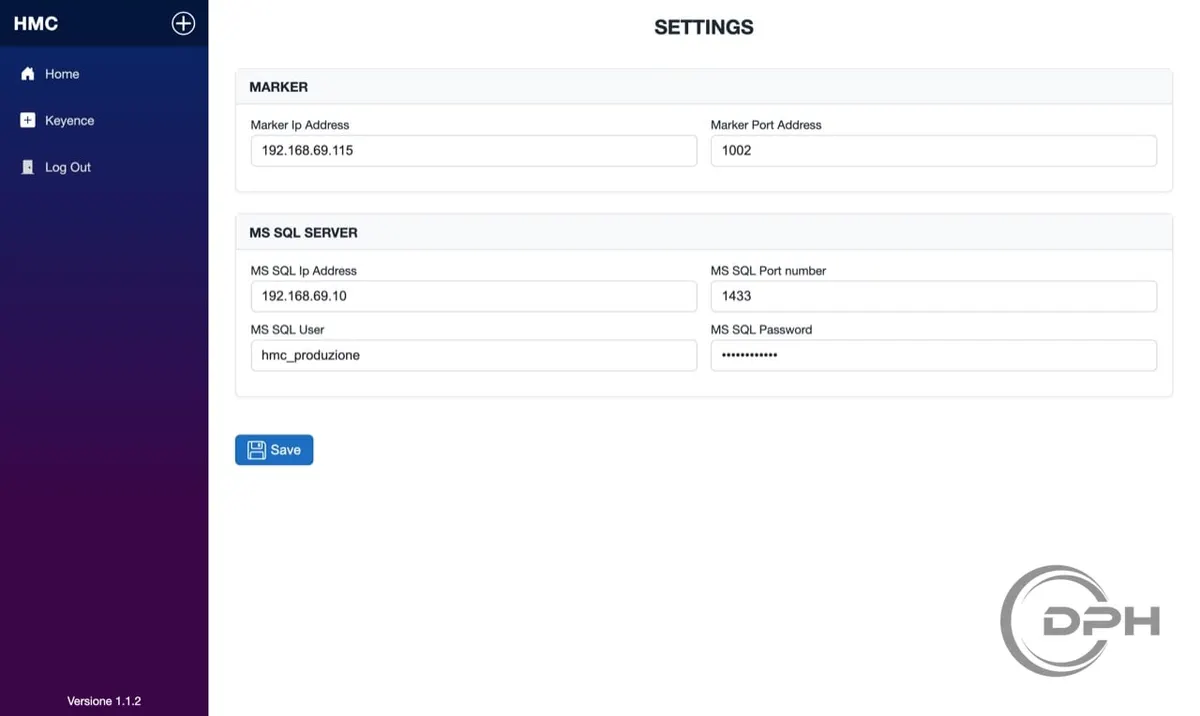
Two panels. One save. The line is connected.
Settings are not for every shift. They are for the person who sets up the station.
Two blocks, nothing else:
- Marker — where the laser sits on the shop floor.
- Data archive — where production orders come from.
Save, and HMC knows who to talk to. From that moment the operator only sees what they need: the order, the part, Start.
What actually gets marked
HMC does not “print a label”. It prepares the permanent mark the laser engraves on the device, in the format the world uses for traceable products:
| Information | What it says about the part |
|---|---|
| Product code | Exactly which article it is |
| Expiry date | How long it can be used |
| Lot | Which other pieces it was born with |
| Serial number | Which individual piece it is |
| Size and type | How it should be read and used |
| QR | Everything together, in a code that can be read in a second |
The serial number advances on its own. It does not repeat. It does not get lost. Every part has its number, and that number stays in the production history.
The benefits you feel on the shop floor
Almost no errors
Data does not pass through the operator’s fingers. It goes from the order to the laser. It is checked on screen, confirmed, and sent. The risk of a 0 instead of an 8 disappears.
More parts in the same shift
No recopying. No hunting for the program. No “wait while I check the sheet”. Enter, verify, Start.
Traceability that stands up to an audit
Lot, expiry, serial, operator, order. When quality or a customer asks where did this piece come from?, the answer is already written on the device and in the archive.
A laser that speaks the language of the line
HMC and the Keyence marker work together. The operator does not have to learn the machine. They only have to produce.
A station you understand in ten minutes
Four screens. Large buttons. Data in plain sight. A new operator can be trained without a three-day course.
One truth, across the whole company
The order says one thing. The screen shows it. The laser engraves it. The last marking repeats it. There are no different “versions” of the same part.
How the work flows, in four steps
1. Sign in → 2. Load the order → 3. Check and confirm → 4. Start
- The operator signs in with their own credentials.
- They enter the production order code.
- They read the data on screen: article, lot, size, expiry, program. If everything is right, they confirm.
- They press Start. HMC sends the laser the product code, expiry date, lot, serial number, size, type and QR. The part is marked. The serial advances. The last marking stays visible for the check.
Then it repeats. Without starting the procedure from scratch. Without typing the data again.
Why it is worth it, in one sentence
HMC takes paper, memory and improvisation out of the way. It leaves the operator with only what they should be doing: look, confirm, produce.
It is HMC Group’s shop-floor tool: built for people who make medical devices, where every part must be able to say who it is — today, in a year, and on the day someone asks.
HMC
From the order to the laser. From the laser to the part. From the part to certainty.
HMC Group — Version 1.1.2